Sign up to Earn or Access 90 Day StoreCash> here

Sign up to Earn or Access 90 Day StoreCash> here

The Good Guys
The Good Guys
Stores
loading...
Seen it Cheaper?1300 942 765
Logo

Microsoft Surface Pro 13" Snapdragon X2 Plus 10 Core 16GB 512GB 12th Edition - Black

EP2-73279
$2799
+ Delivery from $6
± Click the icons above as terms, conditions & fees apply

Participating Credit Cards. 50 Months Interest Free.
No Interest. No Deposit. Monthly payments required.

Online Only
You May Also LikeYou May Also Like

You May Also LikeYou May Also Like

Product Overview

The Surface Pro 13" Snapdragon X2 Plus 10 Core 16GB RAM 512GB SSD 12th Edition - Black runs Windows 11 Home on a 13 inch touch screen for portable productivity.

Designed for users who need a versatile device for work, study or creative tasks, this Microsoft tablet adapts to both tablet and desktop routines. The built-in 165 degree kickstand lets you adjust the angle for comfortable viewing or note-taking, while the lightweight 895g body makes it easy to carry between rooms or campus.

The Qualcomm Snapdragon X2 Plus 10 core processor operates at 4.0GHz for responsive multitasking. With 16GB memory and 512GB SSD storage, you can keep large files and apps ready for use. The 15.5 hour battery life supports all-day sessions, and two USB-C USB4 ports allow fast charging, data transfer and connection to external displays or docks. WiFi 7 and Bluetooth v5.4 provide wireless connectivity for streaming and accessories.

Model EP2-73279 in black comes with a 1 year manufacturer's warranty.

Key Features

  • 13 Inch touch screen with 2880 x 1920 resolution
  • Built in 165-degree kickstand
  • 16GB memory and 512GB storage capacity
  • 15.5 hour battery life for all day use

Key Specifications

Brand:
Microsoft
Model Number:
EP2-73279
Screen Size (Inches):
13
Peak Brightness (Nits):
600
Storage Capacity:
512GB
Cellular or Wi-Fi Only:
Wi-Fi Only
Battery:
15.5 Hour battery Life
Processor:
Qualcomm Snapdragon, 10 Core, 4.0 GHz
Release Year:
2026

Computers & Tablets

Touch Screen:
Yes

Screen Technology

Display Resolution (px):
2880 x 1920

Screen Features

Screen Size Range:
13 - 13.9 Inches

Capacity

Memory:
16GB

Connections

Wireless Connections:
WiFi 7, Bluetooth v5.4
Wired Connections:
2 x USB-C/ USB4, Keyboard port

Cameras

Front Camera:
Quad HD
Rear Camera:
10MP

General Information

Type:
Tablet
Family:
Microsoft Surface Pro
Colour:
Black
Operating System:
Windows 11 Home
Sensor Technology:
Ambient colour, Accelerometer, Gyroscope, Magnetometer
What's In The Box:
Surface Pro 13-inch, Safety / warranty documents, 39W Power Supply with Surface Connect, Quick start guide

Warranty

Manufacturer's Warranty:
1 Year

Computers & Tablets

Touch Screen:
Yes

Screen Features

Screen Size Range:
13 - 13.9 Inches

Connections

Wireless Connections:
WiFi 7, Bluetooth v5.4
Wired Connections:
2 x USB-C/ USB4, Keyboard port

General Information

Type:
Tablet
Family:
Microsoft Surface Pro
Colour:
Black
Operating System:
Windows 11 Home
Sensor Technology:
Ambient colour, Accelerometer, Gyroscope, Magnetometer
What's In The Box:
Surface Pro 13-inch, Safety / warranty documents, 39W Power Supply with Surface Connect, Quick start guide

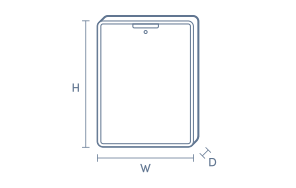
Product Dimensions

Product Height (mm):
287
Product Width (mm):
209
Product Depth (mm):
9.3
Product Weight (g):
895

Box Dimensions

Box Height (mm):
50
Box Width (mm):
228
Box Depth (mm):
307
Box Weight (kg):
2

No reviews found for this product.

The below information is AI generated based on Australian websites information around this item. We have done our best to ensure its accuracy but suggest verifying any information within this tab before purchasing.

At a glance

The Microsoft Surface Pro 13-inch 12th Edition is a premium 2-in-1 tablet built for people who want one device for study, work and portable everyday use. It stands out for its flexible tablet-first design, polished Microsoft ecosystem and easy mobility. It is best for users who value versatility over bulk, but it is less ideal than a traditional laptop for long hours of lap-based typing.

What it’s great for

  • Everyday Productivity
  • Student Computing
  • Remote Work
  • Note Taking
  • Travel-Friendly Computing
  • Media Streaming

Where it works best

  • Home Office
  • University Campus
  • Corporate Office
  • Shared Living Spaces
  • On the Go

Who it’s for

  • University Student
  • Everyday Professional
  • Remote Worker
  • Frequent Traveller
  • Microsoft Ecosystem User

Things to consider

Its 2-in-1 tablet design is highly flexible, but users who spend long stretches typing on their lap may find a traditional clamshell laptop more comfortable.

Student suitability score

9/10 - highly portable, versatile for lectures and assignments, and well suited to mixed study and entertainment use.

Travel portability rating

9/10 - compact 13-inch format makes it easy to carry for commuting, flights and mobile work.

Creative use fit

Good for light to moderate creative tasks, note-taking and content work, but not as specialised as dedicated high-end creative devices.

Family sharing suitability

7/10 - easy for general browsing and streaming, though its premium positioning makes it better suited to personal ownership than shared household use.

Productivity vs entertainment balance

Strong productivity lean with solid entertainment versatility

Key benefits

  • 2-in-1 design: switches easily between tablet use and more structured productivity tasks.
  • 13-inch display: gives you a roomy screen for documents, web browsing and streaming without feeling oversized for travel.
  • Surface Pro form factor: fits well into mobile routines for commuting, campus use and moving between rooms.
  • Windows-based experience: familiar for users who rely on Microsoft apps, file management and desktop-style workflows.
  • Premium build approach: feels well suited to professionals and students who want a more refined everyday device.
  • Black finish: offers a clean, understated look that blends easily into work, study and home environments.
  • Copilot Plus PC platform: better aligned with newer Windows AI features for users who want a more modern PC experience.

Q: Does the Surface Pro 13-inch with Snapdragon X2 Plus run all Windows apps?

A: It runs Windows 11 on Snapdragon, so most everyday apps work well, including web, Office-style and streaming tasks. Some older or highly specialised programs that depend on legacy drivers or plug-ins can still have compatibility limits.

Q: Is a keyboard included with this Surface Pro 12th Edition?

A: No. Surface Pro is designed as a 2-in-1 device, but a keyboard is typically a separate accessory rather than part of the tablet itself. Factor that into the total cost if you want a laptop-style setup for study or long typing sessions.

Q: What can the two USB-C USB4 ports on this Surface Pro be used for?

A: They support charging, fast data transfer and connecting compatible docks, storage or external displays from the same port type. Because there are only two physical ports, a hub or dock is useful if you want power and multiple accessories connected together.

Q: Is this Surface Pro a good choice for typing-heavy work or uni?

A: Yes, if you want a portable 2-in-1 that can switch between tablet and desk use. For frequent typing, it works best with a compatible keyboard accessory, because the tablet on its own is more suited to touch, browsing, note-taking and media use.

Q: Is the Surface Pro 13-inch Snapdragon X2 Plus suitable for gaming?

A: No, it is better suited to productivity, streaming and everyday creative tasks than a gaming laptop. The Snapdragon X2 Plus platform focuses on efficiency and AI features, and some PC games can still vary in performance or compatibility on ARM.