


Canon PIXMA MegaTank Printer G4670
G4670


Product Overview
Key Features
- Print, copy, scan and fax with 100 sheet capacity, A4 to custom
- 4800 x 1200 dpi print, 600 x 1200 dpi scan, up to 11 ppm
- Uses GI-61BK, GI-61C, GI-61M, GI-61Y, Wi-Fi and USB-B port
Key Specifications
- Brand:
- Canon
- Model Number:
- G4670
- Printer Functions:
- Print, Scan, Copy & Fax
- Paper Capacity:
- 100 Sheets
- Max Print Speed:
- 6ppm Colour, 11ppm Black & White
- Wireless Connections:
- Wi-Fi, Camera Direct,
Computers & Tablets
- Printing Resolution:
- 4800 x 1200
- Paper Size:
- A4, A5, A6, B5, LTR, LGL, Executive (184.2 mm x 266.7 mm), 4" x 6", 5" x 7", 7" x 10", 8" x 10", Envelopes DL, Envelopes COM10, Envelopes C5, Envelopes Monarch(98.4 mm x 190.5 mm)), Square (89 mm x 89 mm), Square (127 mm x 127 mm), Card Size(91 mm x 55 mm), [Custom size]width 55 mm - 216 mm, length 89 mm - 1200 mm
- Compatible Ink / Toner:
- GI-61BK, GI-61C, GI-61M, GI-61Y
- Scan Resolution:
- 600 x 1200 dpi
Smart Features
- Compatible Apps:
- AirPrint / Mopria / Canon Print Service (for Android) / PIXMA Cloud Link / Canon PRINT Inkjet/SELPHY (for iOS / Android) / Camera Direct
Connections
- Wired Connections:
- USB-B Port
General Information
- Type:
- Inkjet Printer
- Colour:
- Black
- What's In The Box:
- Printer, Power Cord, Full set of Ink Bottels, Print Hears, Getting started guilde
Warranty
- Manufacturer's Warranty:
- 2 Year
Computers & Tablets
- Printing Resolution:
- 4800 x 1200
- Paper Size:
- A4, A5, A6, B5, LTR, LGL, Executive (184.2 mm x 266.7 mm), 4" x 6", 5" x 7", 7" x 10", 8" x 10", Envelopes DL, Envelopes COM10, Envelopes C5, Envelopes Monarch(98.4 mm x 190.5 mm)), Square (89 mm x 89 mm), Square (127 mm x 127 mm), Card Size(91 mm x 55 mm), [Custom size]width 55 mm - 216 mm, length 89 mm - 1200 mm
- Compatible Ink / Toner:
- GI-61BK, GI-61C, GI-61M, GI-61Y
- Scan Resolution:
- 600 x 1200 dpi
Connections
- Wired Connections:
- USB-B Port
Warranty
- Manufacturer's Warranty:
- 2 Year
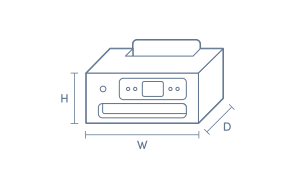
Product Dimensions
- Product Height (mm):
- 415
- Product Width (mm):
- 337
- Product Depth (mm):
- 212
- Product Weight (g):
- 7200
Box Dimensions
- Box Height (mm):
- 210
- Box Width (mm):
- 500
- Box Depth (mm):
- 500
- Box Weight (kg):
- 11

Product Reviews of Canon PIXMA MegaTank Printer G4670

Overall Rating Snapshot
4.5 out of 5 stars from 31 reviews
94% of users recommend this product
What customers say, summarised by AI
- Ink tank system is very economical and reduces refill costs significantly.
- Prints photos well and provides good print quality for normal documents.
- Installation is generally easy, but some users found setup tricky and needed help.
- The screen is very small and not tiltable, making it hard to view options.
- Lacks automatic duplex printing; manual double-sided printing is required.
- Lacks a front paper tray; paper loads from rear, which may not suit all users.
Pros
Easy (9)
Quality (4)
Cleaning (1)
Value (1)
Speed (1)
Cons
Bulky (1)
Canon PIXMA MegaTank Printer G4670
Have only used it a few times but simple to set up and use
Harry
Confirmed purchase 14 October 2026
Published on 10 November 2026
Yes, I recommend this product.
This customer is a verified purchaser who may have received an incentive in return for providing an authentic review.
It is very hard to get al features installed and working.No decent manual to help you.
Steve
Confirmed purchase 24 September 2026
Published on 25 October 2026
This customer is a verified purchaser who may have received an incentive in return for providing an authentic review.
Very economic on ink
It’s super economical. My old printer needed the whole cartridge replaced, so with kids in high school, I basically had to have a budget just for ink. With the Canon Megatank, they print thousands of pages without running out, plus the ink is way cheaper than the others.
Adnan LAGHA
Confirmed purchase 19 September 2026
Published on 14 October 2026
Yes, I recommend this product.
This customer is a verified purchaser who may have received an incentive in return for providing an authentic review.
Printer review
We are very happy to have a printer that does what it’s supposed to do!! Scans and prints and has a mega tank which is more economic than cartridges.
Helen
Confirmed purchase 17 September 2026
Published on 13 October 2026
Yes, I recommend this product.
This customer is a verified purchaser who may have received an incentive in return for providing an authentic review.
Good printer
We were looking to replace our old printer and had almost finalized another canon model but glad we purchased this one. We got a good deal for the printer. It prints the photos really well and also the turnaround time for normal prints is good. Only drawback i feel is that it can’t print both sides which I thought it does. Satisfied with this purchase as I don’t have to worry about the ink cartridge now.
Manisha
Confirmed purchase 9 July 2026
Published on 1 October 2026
Yes, I recommend this product.
This customer is a verified purchaser who may have received an incentive in return for providing an authentic review.
Printer
The Canon printer we purchased was very easy to install and it is easier to use. The only issue that we have found is double sided printing is not automatic as in our older Canon.
Doug
Confirmed purchase 26 July 2026
Published on 21 August 2026
Yes, I recommend this product.
This customer is a verified purchaser who may have received an incentive in return for providing an authentic review.
Setup
Not easy to set up we had to arrange help
Carol Cockburn
Confirmed purchase 16 July 2026
Published on 13 August 2026
Yes, I recommend this product.
This customer is a verified purchaser who may have received an incentive in return for providing an authentic review.
Canon quality with great aftersales service
Replaced 2 year old EPSON that no one was willing to repair or service when it carked it!
Rob L
Confirmed purchase 20 July 2026
Published on 12 August 2026
Yes, I recommend this product.
This customer is a verified purchaser who may have received an incentive in return for providing an authentic review.
Efficient home office printer
The screen is tiny!! The dashboard should be tiltable / adjustable to make it easier to see the buttons and the display. Would have liked this printer to have automatic dual-side printing, although it is handy when the screen advises to manually turn over & print other side... Overall, a pretty good printer, easy to use :)
Robyn
Confirmed purchase 29 June 2026
Published on 22 July 2026
Yes, I recommend this product.
This customer is a verified purchaser who may have received an incentive in return for providing an authentic review.
Ink Saver Never Buy Cartridges Again
The ink is so many times cheaper it absolutely pays itself off. Easy to use. It does manual double sided printing and manual double sided scanning. Which sounds not great but it actually is quite easy as the printer software sets it up so you just feed it back through once more and it works out. You do not have to put through each page at time through.
Michael S.
Confirmed purchase 5 June 2026
Published on 13 July 2026
Yes, I recommend this product.
This customer is a verified purchaser who may have received an incentive in return for providing an authentic review.
You've viewed 10 of 31 reviews
ABOUT THE GOOD GUYS REVIEWSThe Good Guys product reviews are collected from verified purchasers who may have received an incentive in return for providing an authentic review.
The below information is AI generated based on Australian websites information around this item. We have done our best to ensure its accuracy but suggest verifying any information within this tab before purchasing.
At a glance
The Canon PIXMA MegaTank G4670 is a compact, all-in-one inkjet printer ideal for busy homes and small offices. It excels at high-volume, low-cost printing thanks to its MegaTank system, and offers reliable scanning and faxing. Its standout strengths are efficiency and ease of use, but it lacks advanced photo quality compared to specialist photo printers.
What it’s great for
- High-Volume Printing
- Document Scanning
- Everyday Office Tasks
- Low-Cost Printing
Where it works best
- Home Office
- Small Business
- Family Workspace
Who it’s for
- Remote Worker
- Small Business Owner
- Family User
- Student
Things to consider
Photo print quality is suitable for casual use but does not match dedicated photo printers.
Home office suitability score
9/10 - Excellent for high-volume document tasks and multi-function needs.
Photo printing quality
6/10 - Good for casual photos, but lacks specialist photo printer detail.
Ease of use rating
8/10 - Straightforward setup and operation with intuitive controls.
Running cost guidance
Very low ongoing ink costs due to high-yield MegaTank bottles.
Family friendliness
Suitable for families needing reliable printing, scanning, and copying for school and home tasks.
Key benefits
- MegaTank System: Enables up to 6,000 black and 7,700 colour pages per refill, reducing running costs.
- 4-in-1 Functionality: Print, copy, scan, and fax in one compact device.
- Auto Document Feeder: Handles up to 35 sheets for efficient multi-page scanning and copying.
- Wireless Connectivity: Supports Wi-Fi for easy printing from computers and mobile devices.
- 100-Sheet Rear Tray: Accommodates large print jobs without frequent paper refills.
- Low Ink Cost: High-yield bottles keep ongoing expenses minimal compared to cartridge models.
- Compact Design: Fits easily in home or office spaces without taking up much room.
- Easy Maintenance: Simple ink refilling and minimal intervention required.
Q: Is the Canon PIXMA MegaTank G4670 better for frequent printing than a cartridge printer?
A: Yes. The G4670 uses refillable ink tanks rather than standard cartridges, which usually makes it a better fit for higher-volume home or home office printing. The trade-off is a higher upfront price than many entry cartridge models.
Q: Does the Canon PIXMA MegaTank G4670 suit photo printing as well as everyday documents?
A: Yes, it can handle both, but its strongest value is usually everyday colour and black document printing with lower ink refill costs. If photo printing is the main priority, a more photo-focused printer may offer better paper support and image tuning.
Q: Is the Canon PIXMA MegaTank G4670 a good choice if the printer is only used occasionally?
A: Yes, but regular use is still a good habit with any inkjet. Printing a few pages every week or two helps keep ink moving through the system and can reduce the chance of dried nozzles, which matters more for occasional users than with laser printers.
Q: Can the Canon PIXMA MegaTank G4670 print from a phone without being plugged into a computer?
A: Yes. This model range is designed for wireless use, so printing from a phone or tablet is typically the main convenience advantage over basic USB-only printers. You will still need the printer connected to the same network or a supported mobile print method.
Q: Why would someone choose the Canon PIXMA MegaTank G4670 over a laser printer?
A: The main reason is lower refill cost for ongoing colour printing and copying. A laser printer can be better for very fast text-heavy jobs, but a MegaTank model like the G4670 is often the better match for mixed family, school and home office use.
Q: Is refilling the Canon PIXMA MegaTank G4670 messier than replacing cartridges?
A: No, not usually. MegaTank bottles are designed to refill the built-in tanks more directly than pouring loose ink, which is simpler than older refill systems. It still needs a careful, level setup during refill, especially if children use the printer area.